Server Sent Events
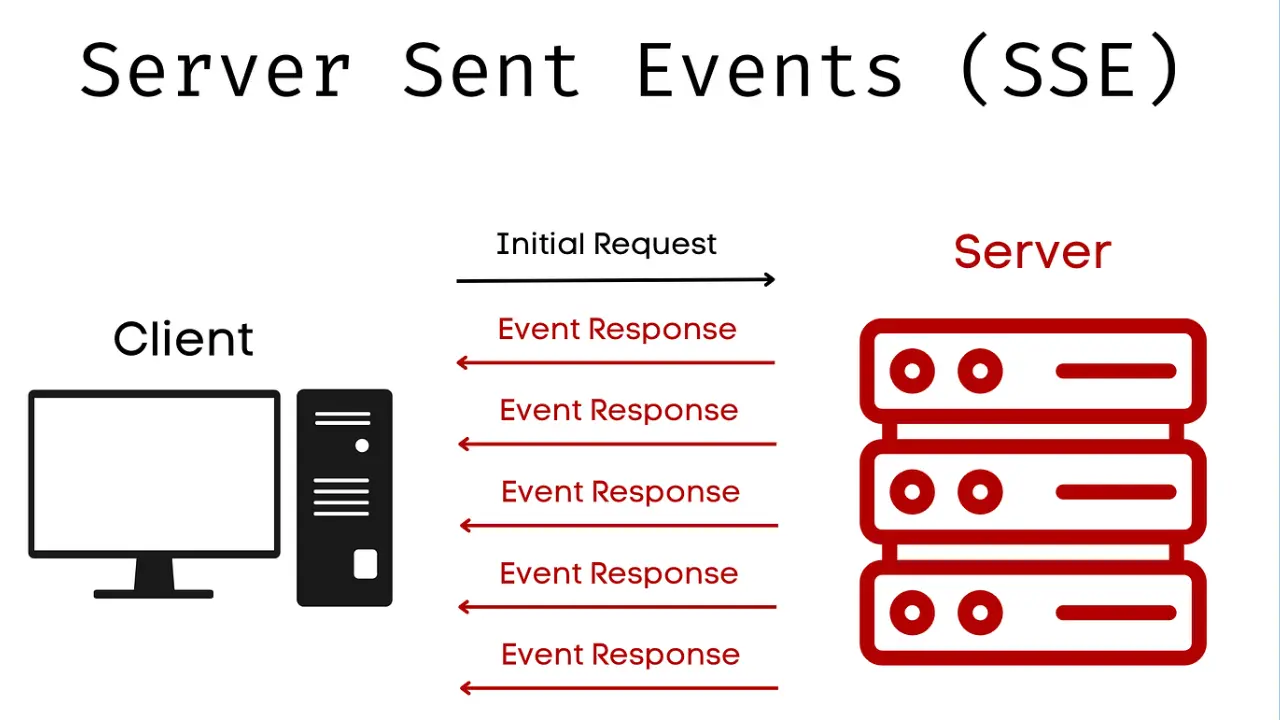
Server-Sent Events (SSE) are a web technology that lets a server continuously send updates to a browser over a single HTTP connection. They are designed for one-way, server-to-client communication, making them a practical fit for live feeds, status updates, notifications, dashboards, and streamed text.
Unlike ordinary HTTP requests, where the browser asks for data and the server sends one response, an SSE connection stays open. The server can then push new events whenever they are available. The browser receives those events through the built-in EventSource interface.
What are server-sent events?
Server-sent events are a standardized way for a web server to stream text-based event messages to a web page. The connection uses HTTP, and the server identifies the response as an event stream with the Content-Type: text/event-stream header.
SSE is intentionally simple: data flows from the server to the client. A browser can still send ordinary HTTP requests back to the server when needed, but the event stream itself does not provide a two-way messaging channel.
How SSE works
An SSE workflow begins when browser JavaScript creates an EventSource object with the URL of an endpoint. The browser makes an HTTP request, and the server keeps the response open instead of completing it after one payload.
- The browser connects to an event-stream endpoint.
- The server responds with Content-Type: text/event-stream.
- The server writes events in the SSE text format as new information becomes available.
- The browser parses each event and calls the appropriate JavaScript handler.
- If the connection drops, the browser normally attempts to reconnect automatically.
A basic event might look like this: event: status data: {“state”:”complete”}
The blank line ends an event. Each event can contain fields such as data, event, id, and retry. The data field carries the message body. If no event field is included, the browser delivers the message through the default message event.
Using EventSource in the browser
Browsers that support SSE expose it through EventSource. The simplest client listens for ordinary messages: const stream = new EventSource(‘/events’); stream.onmessage = (event) => { const update = JSON.parse(event.data); console.log(update); }; stream.onerror = () => { console.log(‘The event stream has a connection problem.’); };
For named events, use addEventListener(): stream.addEventListener(‘status’, (event) => { const status = JSON.parse(event.data); console.log(status.state); });
Call stream.close() when the page no longer needs updates, such as when a user leaves a live view in a single-page application. Closing unused connections helps conserve browser, server, and network resources.
Event format and reconnection behavior
SSE messages are UTF-8 text. A server may send multiple data: lines in one event; the browser joins them with newline characters. Comments, written as lines beginning with a colon, are ignored by the browser and can be used as periodic keep-alive messages.
Reconnection is one of SSE’s most useful built-in behaviors. When a stream ends unexpectedly, the browser generally tries to reconnect. A server can suggest a reconnect delay with a retry: field: retry: 5000
Servers can also assign each message an id:. On a later reconnect, the browser can send the last received ID in a Last-Event-ID request header. That gives the server an opportunity to resume a feed or replay missed events, if the application stores and supports them. SSE does not guarantee delivery by itself; replay and duplicate-handling rules are application design decisions.
Common uses for SSE
SSE works best when the server is the main source of updates and the browser mostly needs to receive them. Common examples include:
- Live monitoring dashboards for jobs, services, devices, or deployments
- Progress updates for a long-running server task
- News, score, market, or activity feeds where updates flow outward
- In-app alerts and notification counters
- Log or audit-event viewers
- Streaming incremental output from a server process
For example, a report-generation page can open an event stream after a user starts a report. The server can send stages such as “queued,” “processing,” and “ready,” while the page uses regular HTTP requests for actions such as canceling or downloading the final file.
Server-Sent Events vs. WebSockets vs. polling
The key difference is direction and connection model. SSE streams updates from server to browser; WebSockets support persistent two-way messages; polling repeatedly asks the server whether anything changed.
| Approach | Communication | Best suited to | Main trade-off |
|---|---|---|---|
| Server-Sent Events | Server to client | Feeds, alerts, progress, live status | Not a bidirectional channel |
| WebSockets | Two-way | Chat, multiplayer interaction, collaborative editing | More connection and protocol handling |
| Polling | Client repeatedly requests updates | Infrequent updates or simple compatibility needs | Extra requests and delayed updates between polls |
SSE is often easier to operate than a WebSocket solution when only the server needs to initiate frequent updates. It uses normal HTTP semantics and works naturally with many existing web-server and authentication setups. Still, the right choice depends on the application. A chat interface, for instance, usually benefits from a true two-way channel because clients send messages frequently.
What an SSE endpoint must do
An event-stream endpoint needs to keep the response open and write properly formatted messages as they occur. At a minimum, it should return the event-stream content type and avoid buffering the entire response before sending it.
A conceptual HTTP response begins like this: Content-Type: text/event-stream Cache-Control: no-cache
The exact implementation differs across programming languages and hosting environments. The important behavior is consistent: flush events as they are produced, keep the connection alive when appropriate, and close it deliberately when the stream is complete or no longer valid.
Proxy and buffering considerations
Some reverse proxies, web servers, and content-delivery layers buffer responses by default. Buffering can defeat real-time delivery because updates may wait in a buffer instead of reaching the browser promptly. Configure the path used for streaming so that it supports long-lived, flushed responses.
Connection timeouts also matter. An infrastructure component may close an idle connection before the application expects it. Periodic SSE comments can help keep an otherwise idle stream active, but they should be used with reasonable intervals and tested in the actual deployment environment.
Authentication and cross-origin access
An EventSource connection follows browser security rules. For same-origin streams, existing cookie-based sessions may be sent according to normal browser cookie settings. For cross-origin streams, the server must provide appropriate CORS headers, and credentialed requests require deliberate configuration on both client and server.
Because the browser’s native EventSource API has limited request customization, avoid placing sensitive credentials in a URL query string. Use secure, short-lived, or session-based authentication patterns appropriate to the application, and serve protected streams over HTTPS.
Limitations to plan for
SSE is not a universal real-time transport. Its most obvious limit is one-way communication. The client needs separate HTTP requests for commands, form submissions, acknowledgments, or other client-to-server data.
There are also practical scaling concerns. Each active viewer holds an open connection, so servers and intermediaries must be configured for the expected number of concurrent streams. If several tabs each open a connection, browser connection limits and resource use may become relevant, especially in older HTTP/1.1 deployments. HTTP/2 can change connection behavior through multiplexing, but application capacity still needs planning and testing.
Finally, SSE carries text. JSON is common because it is easy to parse in browsers, but binary data needs another approach, such as sending a URL, an encoded representation, or using a different transport where that better fits the need.
Practical design tips
- Send small, purposeful events. Treat the stream as an update channel, not a replacement for every API response.
- Name event types clearly. Separate events such as status, notification, and complete when the client handles them differently.
- Use IDs when missed updates matter. Pair event IDs with a defined replay policy and make clients safe to receive an event more than once.
- Handle reconnects in the user interface. Display a sensible connection state when freshness is important.
- Validate data on the client. Streaming data is still untrusted input from the perspective of browser code; parse and render it safely.
- Monitor open connections and failures. Production issues often involve timeouts, buffering, authentication expiry, or capacity rather than the event syntax itself.
Frequently asked questions
Are Server-Sent Events the same as WebSockets?
No. SSE sends messages from server to browser over HTTP, while WebSockets provide a persistent two-way communication channel. SSE is usually the simpler option when the browser mainly receives updates.
Hibbett Sports Guide Shoes, Apparel, Sneaker Releases & More
Do Server-Sent Events reconnect automatically?
Yes, browser EventSource implementations normally try to reconnect after an unexpected interruption. A server can suggest the retry delay and use event IDs to help resume a stream, but reliable replay requires application support.
Can SSE send JSON?
Yes. SSE delivers text, so a server can place JSON in a data: field and the browser can parse it with JSON.parse(). The server should ensure each event remains valid text in the SSE format.
Can a browser send data through an EventSource connection?
No. The EventSource stream is server-to-client only. Use fetch(), an HTML form, or another HTTP request for client-to-server actions.
Soccer Ball Sizes, Designs, Technology, Drawing Tips
When should SSE not be used?
Choose another approach when the application needs frequent low-latency messages in both directions, needs to exchange binary data directly, or cannot support long-lived HTTP responses in its infrastructure. WebSockets are often a better fit for interactive two-way sessions.
Conclusion
Server-sent events offer a focused way to deliver live browser updates without building a bidirectional socket protocol. They are a strong choice for one-way feeds, progress reporting, alerts, and dashboards, particularly when automatic reconnection and ordinary HTTP integration are useful. Plan for authentication, proxy behavior, reconnect handling, and concurrent connections, then use WebSockets instead when the interaction truly needs two-way messaging.